AVCAD for AutoCAD

50 USD/M

200 USD/y

ABOUT THE PRODUCT

AV Plugin for Autodesk AutoCAD.
Operating System – Microsoft Windows.

DOWNLOAD

Download AVCAD for AutoCAD and start your 2-week free trial upon first launch. Choose your preferred download option: DOWNLOAD 1 or DOWNLOAD 2. Follow the instructions below and refer to the QuickStart Guide to get started with AVCAD for AutoCAD.

For AutoCAD (v.3.9.4)

After the installation is complete, open AutoCAD. You can find all the plugins under the Add-ins tab on the ribbon.

Note: Skip the next step if you are going to use the 2-week free trial. Simply install and run AVCAD.
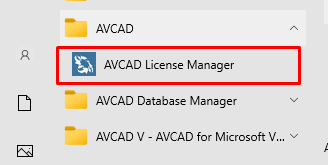
To activate the software with a serial number, run AVCAD License Manager and follow the instructions

AUTODESK APPSTORE & AUTOCAD

If you want to get a trial version from the Autodesk Appstore simply send the email address associated with your Autodesk App Store account to support@aadbsoftware.com.

TUTORIALS

Learn how to work with AVCAD with the help of tutorials on our YouTube channel. Check out the AVCAD 101 course and AVCAD 102 course to learn how AVCAD can be used in large-scale projects.

PAYMENT

After the trial period, you can purchase a monthly or yearly AVCAD for AutoCAD subscription through the official Autodesk website or using the payment methods available on our website.

Please review our refund policy before making a purchase. To purchase a subscription, please choose your preferred payment method below:

1. Autodesk App Store

After purchasing AVCAD from the Autodesk App Store, download and install the MSI file, then log in to your account in AutoCAD.

BUY

2. PayPal

Payment options
E-mail

3. Payoneer

If you want to pay by card, contact us at support@aadbsoftware.com and we will send you a Payoneer payment link.

4. Bank invoice

Contact us at support@aadbsoftware.com if you would like to receive a bank invoice.

Note: The total cost includes the software price and the bank transfer fee.

For payments via PayPal, Payoneer, or bank invoice:

After your purchase, you will receive an email with your product key. To activate your license, please visit this page.


During the subscription period, you will receive an AVCAD license, all updates, and customer support at no additional cost.


AVCAD for BricsCAD, ZWCAD, GStarCAD

50 USD/M

200 USD/y

ABOUT THE PRODUCT

AV Plugin for BricsCAD, ZWCAD and GstarCAD
Operating System – Microsoft Windows.

DOWNLOAD

You can download the BricsCAD, ZWCAD, or GstarCAD version of AVCAD. You will have a 2-week free trial after the first launch. Choose your preferred download option: DOWNLOAD 1 or DOWNLOAD 2.

For BricsCAD (v.3.9.4)

For ZWCAD (v.3.9.4)

For GStarCAD (v.3.9.4)

After downloading and installing the required version, a new folder will be created in C:\\AADB.

  • BCAD stands for BricsCAD

  • ZCAD stands for ZWCAD

  • GCAD stands for GStarCAD

To activate the software with a serial number, run AVCAD License Manager and follow the instructions


Note: Skip this step if you are going to use the 2-week free trial. Simply install and run AVCAD.

To load AVCAD, follow these steps:

  • Open your CAD software.
  • Type the _appload command.
  • Select the LSP file (the filename depends on your CAD software, for example, AVCAD_ZWCAD.lsp).
  • Restart your CAD software. A new ribbon panel with AVCAD tools should appear.

TUTORIALS

Learn how to work with AVCAD with the help of tutorials on our YouTube channel. Check out the AVCAD 101 course and AVCAD 102 course to learn how AVCAD can be used in large-scale projects.

PAYMENT

After the trial period, you can purchase a monthly or yearly AVCAD subscription for BricsCAD, ZWCAD, or GstarCAD.

Please review our refund policy before making a purchase. To purchase a subscription, please choose your preferred payment method below:

1. PayPal

Payment options
E-mail

2. Payoneer

If you want to pay by card, contact us at support@aadbsoftware.com and we will send you a Payoneer payment link.

3. Bank invoice

Contact us at support@aadbsoftware.com if you would like to receive a bank invoice.

Note: The total cost includes the software price and the bank transfer fee.

For payments via PayPal, Payoneer, or bank invoice:

After your purchase, you will receive an email with your product key. To activate your license, please visit this page.


During the subscription period, you will receive an AVCAD license, all updates, and customer support at no additional cost.
Scroll to Top